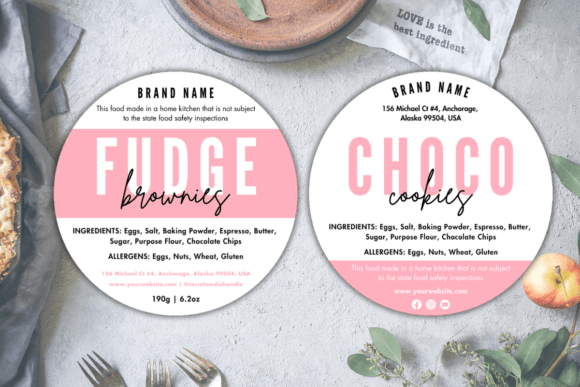
Elevate Your Cottage Food Business with the Canva Cottage Law Label Template
If you’re a maker, baker, or small-scale food producer operating under cottage food laws, you know that a professional presentation is just as important as a delicious product. Navigating labeling requirements can be one of the more daunting administrative tasks for home-based food businesses. The Canva Cottage Law Label Template is a digital design solution crafted specifically to simplify this process. It provides a structured, compliant foundation for your product labels, allowing you to focus on what you love—creating.
What Exactly Is This Digital Template?
First and foremost, THIS IS A DIGITAL ITEM. NO PRINTED ITEM WILL BE SHIPPED TO YOUR HOME. Upon purchase, you receive a .zip file containing a PDF template. This isn’t a physical label; it’s a customizable digital blueprint. The core template is sized at 3x3 inches, a versatile dimension that you can easily resize within Canva to fit various packaging needs—from mason jars to bakery boxes. The magic happens when you open it in Canva, a free online design platform. You don’t need specialized software or advanced design skills; a web browser and a free Canva account are all you need to edit every element.
Real-World Scenarios: Where This Template Becomes a Game-Changer
The usefulness of the Canva Cottage Law Label Template stretches across numerous situations. Imagine a home baker preparing for a weekend farmer’s market. Instead of hand-writing labels or struggling with inconsistent formatting, they can quickly input their bakery name, ingredient list, net weight, and any required allergen statements into the pre-organized template. Consistency across all their cookies, breads, and pastries builds customer trust and brand recognition instantly.
For the Artisan Preserves Maker
A producer of small-batch jams and pickles needs labels that communicate both homemade charm and regulatory compliance. Using the template, they can maintain a clean, legible font for mandatory information while using Canva’s library to add a rustic illustration or a custom logo. The resizing feature means the same label design can adapt from a 4oz jam jar to a 16oz pickle jar without starting from scratch each time.
For the Seasonal Holiday Business
Many cottage food operators see a surge in sales during holidays. A chocolatier making gift boxes for Valentine’s Day or Christmas needs to pivot quickly. The digital template allows for rapid batch updates. Perhaps they add a seasonal “Happy Holidays” banner or change the accent color to red for a festive theme—all edits made in minutes, ensuring their products look timely and professional without delaying production.
Beyond Compliance: Building Your Brand Identity
While the primary function is to ensure your label meets your state’s cottage law requirements—typically listing your business name, address, product name, ingredients, net weight, and allergen information—this template is also a springboard for your brand. A well-designed label is a marketing tool sitting on your customer’s shelf. The editable nature of the Canva Cottage Law Label Template means you can infuse your personal style. Is your brand cute and whimsical? Use playful fonts and colors. Is it classic and elegant? Opt for sleek typography and a minimalist layout. This flexibility helps different users across industries—from vegan snack creators to organic tea blenders—benefit in their own unique way.
Common Considerations Before You Start
Before diving into customization, it’s crucial to double-check your specific state’s cottage food regulations. Label requirements can vary. The template provides the framework, but you are responsible for inputting the correct, legally required information for your location. Also, consider your final packaging. Think about the label size and shape you’ll need and test the resizing in Canva before finalizing your design. A practical observation from many users is to create a master label file in Canva, then duplicate it for each product line, ensuring uniformity while saving time.
The Practicalities of Printing Your Custom Labels
Once your design is perfect, you have full control over printing. HOW TO PRINT YOUR FILES offers two main paths. You can print at home using sticker paper or cardstock if your printer supports the quality you desire. This is ideal for small batches or testing. For larger volumes or a more professional finish, you can have the files printed professionally at local stores like Staples or Office Depot, through online services like Vistaprint, or at a trusted local print shop. Simply export your finished design from Canva as a high-quality PDF or image file and send it to your chosen printer.
Strengths and Potential Limitations
The core strength of this tool is its simplicity and accessibility. It removes the barrier of complex graphic design software. It’s also incredibly cost-effective, as it leverages a free editing platform. The resizable feature and ease of customization are major benefits for growing businesses. A potential limitation to note is that it is a template, not a dynamic legal advisor. It won’t auto-fill your specific legal text; that knowledge and input must come from you. Also, while Canva is versatile, extremely intricate or non-standard label shapes might require additional design work outside the template’s starting point.
For the Multi-Product Business Owner
If you offer a range of products, the template’s structure becomes a powerful organizational tool. You can establish a cohesive color-coding system (one color for baked goods, another for preserved items) using the editable elements, making inventory and customer selection easier. This practical approach turns a compliance task into a strategic branding exercise.
In essence, the Canva Cottage Law Label Template is more than just a label maker. It’s a digital partner for your cottage food business, blending necessary compliance with creative expression. It empowers you to present your homemade products with the confidence and polish they deserve, directly from your home workspace to your customer’s hands.